
A few years ago, we started doing something new with ComposeCreate music: including mp3s with the purchase of ComposeCreate pieces. Why? Hearing a professional recording of the piece helps inspire students, and let them know how to play artistically. It can also aid in home practice, because they know how the piece should sound. Teachers and students love it, and we’ve heard that it really makes a difference for students!
Now, in addition to those mp3s being included for download, we’re including a QR code on the front of each piece! If you’re unfamiliar with QR codes, don’t worry – we explain it all below. And if you already use them you know how much easier this will make it for your students to access the music recording instantly!
What is a QR code?
A QR code is a set of black and white squares/pixels that are set in a square shape. These pixels store data that smartphones can quickly turn into information (typically they lead you to a specific web page). All that means is that if you open your smartphone camera and hold it up in front of a QR code, you’ll be prompted to visit a site. If you click on the URL that comes up on your phone, you’ll be taken to the web page.


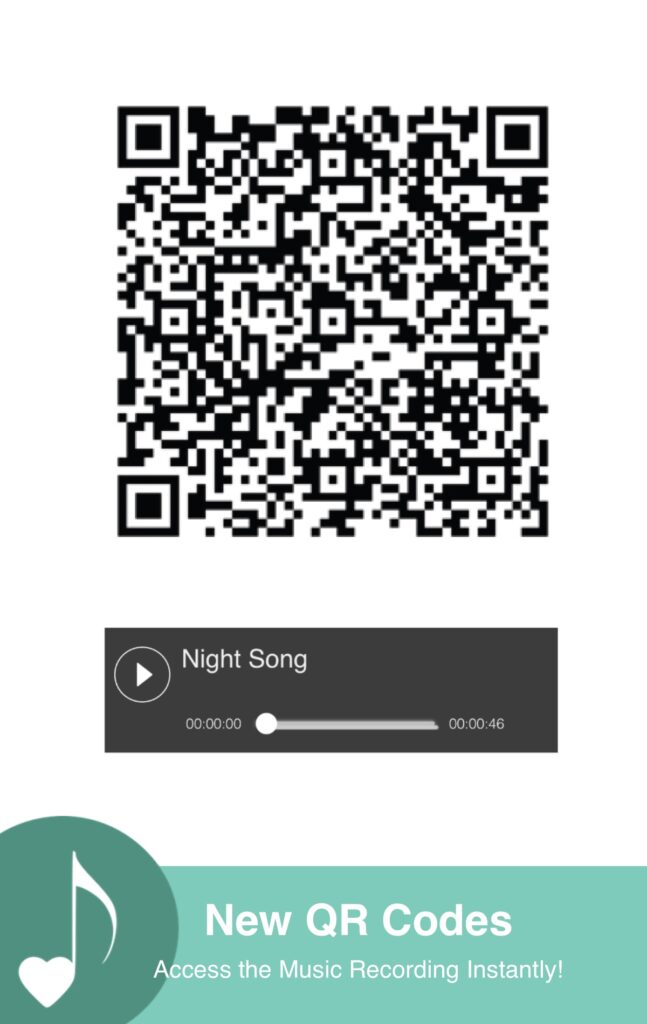
Even if you don’t know how to use them, it’s likely that you’ve seen them places. And your students likely use them all the time! Here’s an example using the piece “Night Song”. Simply open your camera and put the QR code in the frame (like you’re taking a picture of it). Click on the URL that will come up on your phone. Now you’ll see a page that looks like the image above, where you can press play and immediately hear the recording.
How do I use it with my students?
The QR code is printed on the very first page of the piece in the top right corner. As long as your student has the music, they have the QR code!
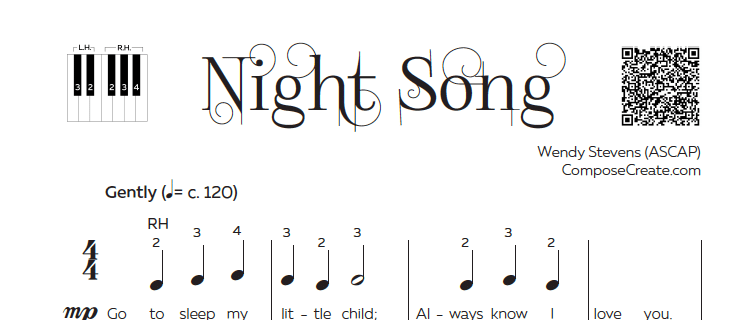
If you teach in person, have students scan the QR code during their lesson so they know the recording is there. If you teach online, just let them know where it is so they can access the recording instantly!
*Something to note: the QR codes are only on the pieces we introduced at the January 2024 webinar. That includes all pieces in this bundle, and Jason Sifford’s new pieces. The sample pages don’t include the QR code, but they are on the music once you purchase it!
How will this help me and my students?
Giving students a professionally recorded mp3 means they can:
- Hear how the piece sounds (this can help home practice become more accurate)
- Begin understanding how to play more artistically
- Feel inspired about the piece (which means more motivation to practice during the week!)
- Listen for mistakes while practicing at home
Because all your students need to do is scan the QR code, it saves you the time and hassle of locating the mp3 file, downloading it, and attaching it to an email. And that’s assuming that the parent will remember to open the email, and download the mp3!
Once that QR code is used to open the audio page on their phone, they can listen then and there. Since many teens have their phones on them at all times, it means they can listen on the school bus, at home, in the car, or anywhere else!

Do you like the new QR codes? Do you want more?
QR codes are something we believe will be really helpful for students and teachers. It’s something we think we’ll be doing for future music, but it does take time, money, and staff to happen! Because of that, we need to know it’s something that teachers find really valuable. Here’s how you can let us know that they’re helpful to you so we can decide whether to include them for future pieces (and whether we consider adding them to past pieces as well!):
- Buy the current music with QR codes: Color of Music 2, Jason Sifford’s Dancing Away, Exploring Beautiful Places 2, Little Fuzzies Bundle, and Night Song.
- Leave a review for each of the pieces and in addition to telling us what you think about the music, let us know how you liked and used the QR codes.
We really hope this is something that saves you time, motivates your students, and makes teaching just a bit easier for you! Let us know in the comments if you’ve used the QR codes!

I ABSOLUTELY love this idea! I have been wanting to find time to sit down and explore the use of QR codes in my teaching. I never thought that composers would add them to their music – woo hoo!
Yes, please make QR codes for all the music! I have used this already in my studio whenever I have more digital info I want to pass along to students or parents, like links to books to buy or apps to try. I include them on printed materials like welcome letters and flyers. It’s more accessible than you think. I started using it as soon as I saw the option to create QR codes after right clicking near links using a PC. Try it! They’re great!
Yes, yes, yes!! I love the QR codes and would use them with my students!! Please continue to do this! Great idea!
Absolutely! Great idea! When I purchase music from you it seems I nearly always forget about the MP3’s ! It’s also another chunk of time that has to be spent to share the music, so the QR code will be a wonderful and convenient feature! Thanks for thinking of this!
Agree wholeheartedly with the reviews.
Yes, more QR codes please for past present and future pieces.
Blessings and a big thankyou to you Wendy and your team for enriching the world of music.
Irene from Aus.
YES!!!! More please. Thank you.
I love the QR codes! I have shown several students how to use them with some of the new pieces. Instant hit for me and them! Please consider doing this with all your music, and if possible with past music, as well! Thank you!!
The QR codes are a game changer! Would love to see them on all the music.
Thank you!
QR code. If I’m using my phone, how do I go about approaching the qr code. It’s all new to me.
Good question! There’s an image above that gives you a 1, 2, 3 step. Just open your camera app and point your camera on the QR code. When it focuses on it, you’ll see a link pop up that you can click. Click on that and it takes you directly to the page with the recording! If it doesn’t pull up a link, then move your camera slowly closer and farther away to make sure it’s focused on the QR code and it should pop up!